Every year, preventable industrial accidents occur because maintenance work begins without proper machine isolation. The root cause? Missing, incomplete, or improperly used lockout tagout documentation forms. These aren’t just administrative checkboxes—they are legal, operational, and ethical safeguards. When a technician opens a panel on a conveyor system without confirming all energy sources are locked and documented, lives are on the line. This article breaks down what a lockout tagout documentation form should include, how to use it effectively, and where most organizations fall short.
What Is a Lockout Tagout Documentation Form?
A lockout tagout (LOTO) documentation form is a standardized record used during maintenance or servicing of equipment to verify that all hazardous energy sources have been isolated and secured. It’s part of a broader energy control program mandated by OSHA (29 CFR 1910.147) and serves three core purposes:
- Verification: Confirms that all energy sources (electrical, mechanical, hydraulic, pneumatic, thermal, etc.) are disconnected and locked.
- Accountability: Tracks who applied locks and tags, when, and for what purpose.
- Compliance: Provides auditable proof that safety procedures were followed.
Unlike a generic checklist, a true LOTO documentation form is tied directly to a site-specific energy control procedure and is completed during the lockout process—not after the work is done.
Common Misconception: Many confuse the LOTO documentation form with the LOTO procedure itself. The procedure outlines how to isolate equipment. The form is the proof it was done correctly.
Why Most Forms Fail in Real-World Use
Despite widespread awareness, LOTO incidents remain a leading cause of industrial injuries. A 2023 National Safety Council report found that 60% of LOTO-related violations stemmed from poor documentation—not lack of training.
Here’s where most companies go wrong:
- Generic Templates: Using one-size-fits-all forms that don’t reflect specific equipment or energy types.
- Rushed Completion: Filling out forms after work starts, defeating the purpose.
- Lack of Verification: No designated person reviews or signs off on the form.
- Digital Gaps: Relying on paper in high-moisture or outdoor environments where forms degrade.
Real Example: At a Midwest packaging plant, a maintenance worker was injured when a compactor unexpectedly powered on. Investigation revealed the LOTO form listed only electrical isolation—despite the machine using hydraulic pressure. The form didn’t prompt verification of secondary energy sources.
Key Elements of an Effective LOTO Documentation Form
An effective form isn’t long—it’s precise. It forces decision-making at every step. Here’s what must be included:
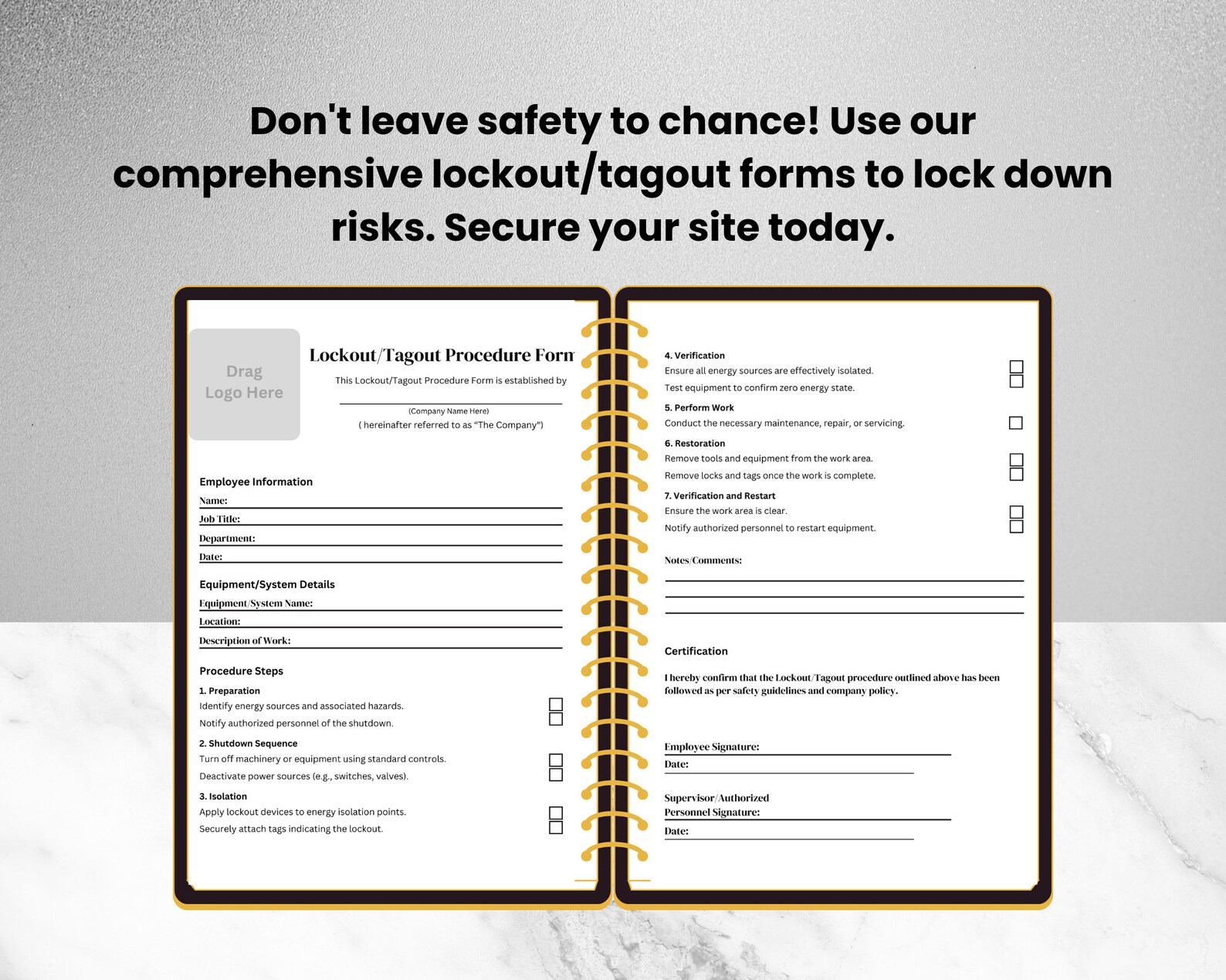
#### 1. Equipment Identification - Machine name, ID number, and location - Clear photo or diagram reference (especially in facilities with similar equipment)
#### 2. Authorized Personnel - Name and signature of the authorized employee performing lockout - Names of affected employees notified of the outage
#### 3. Energy Source Inventory - List all energy types involved (e.g., 480V electrical, 120 psi pneumatic, stored spring tension) - Method of isolation (e.g., circuit breaker off, valve closed, bleed line)
#### 4. Lock and Tag Details - Number, type, and location of locks applied - Tag content: reason for lockout, date, time, expected duration

#### 5. Verification of Isolation - Step confirming zero energy state (e.g., “Tested voltage with multimeter—reading 0V”) - Sign-off by technician who performed verification
#### 6. Clearance and Re-Energization - Final check before removing locks - Signature of person releasing lockout - Time re-energized
Pro Tip: Include a “Pre-Work Brief” section where the technician notes hazards discussed with the team. This creates a record of communication, not just mechanical steps.
When to Use a LOTO Documentation Form
The form isn’t needed for minor tool changes or routine cleaning—OSHA’s “minor servicing exception” allows for exemptions under specific conditions. But if the task involves reaching into a point of operation or exposing employees to unexpected energization, documentation is non-negotiable.
Use cases requiring documentation: - Replacing a motor on a production line - Clearing a jam in a conveyor system - Servicing a hydraulic press - Inspecting a boiler during shutdown
When you can skip documentation (with caution): - Changing a saw blade on a bench saw with single isolation point - Cleaning a mixer bowl with no moving parts involved
Even in exempt cases, a simplified tag (without full form) should be used to signal ongoing work.
Paper vs. Digital: Which Is Better for LOTO Forms?
While paper forms are still common, digital LOTO documentation is gaining ground—especially in facilities with high regulatory scrutiny or complex equipment.
| Factor | Paper Forms | Digital Forms |
|---|---|---|
| Accessibility | Requires physical storage | Cloud-based, accessible from any device |
| Durability | Vulnerable to damage | Resistant to environment |
| Audit Trail | Manual tracking | Automatic timestamps, GPS, user logs |
| Integration | None | Can link to CMMS, ERP, or safety databases |
| Error Prevention | No validation | Fields can be required, logic-driven |
Limitation of Digital: Requires devices and connectivity. In remote or hazardous zones, paper may still be more practical.
Best Practice: Hybrid approach. Use digital for central records, but allow printed versions for field use—with a requirement to scan and upload post-completion.
5 Real-World LOTO Documentation Templates (and How to Adapt Them)
Templates are starting points—not end solutions. Below are common types used across industries, with notes on customization.
- Manufacturing Line Shutdown Form
- - Focus: Multi-energy isolation on assembly equipment
- - Add: Conveyor run-in/run-out zones, robot safety zones
- - Use at: Automotive, food processing
- Electrical Panel Lockout Sheet
- - Focus: High-voltage systems with multiple breakers
- - Add: Arc flash boundary confirmation, PPE verification
- - Use at: Power distribution centers, data centers
- Mobile Equipment Isolation Log
- - Focus: Forklifts, scissor lifts, cranes
- - Add: Key removal, wheel chocks, outrigger status
- - Use at: Warehouses, construction sites
- Batch Process Lockout Record
- - Focus: Chemical or pharmaceutical reactors
- - Add: Residual pressure/vacuum check, purge verification
- - Use at: Processing plants with closed systems
- Group Lockout Master Form
- - Focus: Multiple technicians on one machine
- - Add: Hasp lock count, individual lock numbers, meeting record
- - Use at: Planned shutdowns, capital repairs
Critical Insight: No template replaces a site-specific energy control procedure. Always validate forms against actual equipment and workflows.
Common Mistakes That Invalidate a LOTO Form
Even a well-designed form can be undermined by poor execution. Watch for these red flags:
- Blank fields left unchecked – “N/A” should be written, not skipped
- Signatures added after work completion – invalidates the sequence
- Using personal locks without logging – defeats accountability
- Failing to verify zero energy – assumption is not safety
- Not involving affected employees – OSHA requires communication
Case Study: A paper mill received a $75,000 OSHA fine because LOTO forms showed three energy sources isolated—but infrared review showed a steam valve was still hot. The form was technically “complete,” but verification was missing.
How to Audit Your LOTO Documentation Process
An annual audit isn’t enough. Spot checks and random reviews should happen quarterly—or monthly in high-risk environments.
Audit Checklist: - Are forms filled before work starts? - Do they match the written energy control procedures? - Is zero energy state tested and recorded? - Are locks removed only by the person who applied them? - Are forms archived for at least one year?
Use a scoring system: 0–5 points per item. Any form scoring below 4 needs retraining.
Workflow Tip: Assign a rotating “LOTO steward” each month—someone responsible for reviewing 10 random forms and reporting gaps to safety leadership.
Closing: Make Documentation Part of the Safety Culture
A lockout tagout documentation form is more than a compliance tool—it’s a cultural indicator. When forms are consistently used, accurate, and respected, it signals that safety is procedural, not optional. Start by auditing your current forms against real equipment. Train supervisors to review—not just collect—them. And never treat documentation as an afterthought. Because in the seconds before a machine powers on, the form may be the only thing standing between a technician and a life-altering injury.
Update your templates, enforce verification, and treat every signature as a promise: This machine is safe because I confirmed it.
Frequently Asked Questions
What should be done with completed LOTO documentation forms? Completed forms should be stored securely for at least one year for audit and incident investigation purposes. Digital storage with backup is recommended.
Can multiple machines be covered on one LOTO form? Only if they are part of a single energy control procedure and serviced simultaneously. Otherwise, each machine requires its own documented lockout.
Who is responsible for filling out the LOTO documentation form? The authorized employee performing the servicing or maintenance is responsible for completing and signing the form.
Is a LOTO form required for every shift change during extended maintenance? Yes. If the lockout spans shifts, the oncoming authorized employee must sign the form, verify isolation, and apply their own lock.
Can a LOTO form be reused for recurring tasks? No. A new form must be completed for each lockout event, even if the task is repeated daily.
Does OSHA require a specific LOTO form format? OSHA does not mandate a specific format, but the form must document all required elements of the energy control procedure.
Can a LOTO form be completed on a mobile device? Yes, as long as the digital system ensures authenticity, prevents tampering, and maintains a permanent record.
FAQ
What should you look for in Lockout Tagout Documentation Form Essentials? Focus on relevance, practical value, and how well the solution matches real user intent.
Is Lockout Tagout Documentation Form Essentials suitable for beginners? That depends on the workflow, but a clear step-by-step approach usually makes it easier to start.
How do you compare options around Lockout Tagout Documentation Form Essentials? Compare features, trust signals, limitations, pricing, and ease of implementation.
What mistakes should you avoid? Avoid generic choices, weak validation, and decisions based only on marketing claims.
What is the next best step? Shortlist the most relevant options, validate them quickly, and refine from real-world results.